This is a refresher course. I already have a diploma in Oracle RDBMS.
Structured Query Language
- A language for relational databases
- Used to query data
Data
Collection of facts (words, numbers), pictures.
- Data needs to be secured, and accessed when required.
- The above can be achieved using a Database.
Database
- Is a repository of data / it is a program that stores data.
- Provides functionality for adding, modifying and querying data.
Different kinds of datbases
- Relational database
- Data is stored in tabular form - columns & rows
- Like in spreadsheet
- Cols - has properties about each item - such as last name, first name, email address, etc.
- Table is a collection of related things - example employees, salary, etc.
- In a relational database, you can form relationship between tables.
- Emp table, Salary table, etc. etc.
- RDBMS
- DMBS
- Database Management System - set of software tools for the data in the database is called DBMS.
- Database is a repository of data
- Terms database, database server, database system, data server, DBMS are all used interhangeably.
RDBMS
- MySQL, DB2, Oracle
SQL
- Create table
- Insert data to a table
- Select statement to see the data in a table
- Update data in a table
- Delete data from the table
Types of SQl Statements
- Data Definition Language
- Data Manipulation Language
- Data Control Language
- Transaction Control Language

Image courtesy: Geeksforgeeks.com
Results coming in from an SQL query is called a table or a Result Set.
Define Table structure of an existing table
sp_help BOOK;

DML - Read and Modify data
Select Statement
- Select col1, col2, col3 from FilmLocations;
- Select * from FilmLocations;
- Select count(*) from FilmLocations;
- Select DISTINCT(Directors) from FilmLocations;
- Select * from FilmLocations LIMIT 25;
- SELECT DISTINCT Title FROM FilmLocations WHERE ReleaseYear=2015 LIMIT 3 OFFSET 5; Retrieve the next 3 film names distinctly after first 5 films released in 2015.
INSERT Statement
- Insert into TableName ColumnName1, ColumnName2, ColumnNameN values <Value1>, <Value2>, <ValueN>;
- Inserting 1 row at a time:
- Insert into AUTHOR (Author_ID, Lastname, Firstname, Email, City, Country) values ('A1', 'Chong', 'Raul', 'rfc@ibm.com', 'Toronto', 'CA');
- Multiple rows can be inserted.
- Insert into Author (Author_ID, Lastname, Firstname, Email, City, Country)
('A1', 'Chong', 'Raul', 'rfc@ibm.com', 'Toronto', 'CA')
('A2', 'Ahuga', 'Rav', 'ra@ibm.com', 'Toronto', 'CA')
);
- Insert into Instructor(ins_id, lastname, firstname, city, country) VALUES (8, 'Ryan', 'Steve', 'Barlby', 'GB'), (9, 'Sannareddy', 'Ramesh', 'Hyderabad', 'IN');

Entity name - Author
Entity Attibutes - Author_ID, Country, City, Email, FirstName, LastName.
Update statement
- Alter data in a table using UPDATE statement.
- Update TableName SET ColumnName1=Value1 WHERE [condition];
- Example, Update AUTHOR SET Lastname='KATTA', Firstname='Lakshmi' WHERE AUTHOR_Id='A2';
- If where clause is not specified all rows will be updated.

Delete statement
- Read and modify data.
- Delete from TableName WHERE <condition>;
- Delete from AUTHOR WHERE Author_ID in (a1, a2); both the rows will be deleted.
- If where clause is not specified all rows will be deleted.

Relational Databases
1. RELATIONAL MODEL

2. E-R MODEL (Entity - Relationship Model)
Book - entity (drawn as rectanges in E-R diagrams)
Attribute - Title, Description, etc. (drawn as ovals in E-R diagrams)

- Entity Book becomes a table in a database.
- Attributes become the columns.

PK uniquely identifies each Tuple / Row in a table.

Foreign Keys are Primary Keys defined in other tables. They create link between the tables. In the above example, Author ID is a primary key in Author table, but in the Author List table, it is a Foreign Key linking the table Author List to the table Author.
Common Datatypes include Characters (VARCHAR), Numbers, and Date/Times.
DDL VS DML
- DDL - define, change and drop data.
- CREATE
- ALTER
- TRUNCATE
- DROP
- DML - read and modify data in tables.
- Also known as CRUD operations.
- INSERT
- SELECT
- UPDATE
- DELETE
CREATE

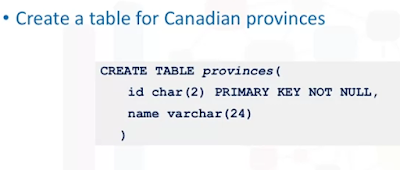
Create table AUTHOR (
AUTHOR_ID Int PRIMARY KEY NOT NULL,
Lastname varchar (30) NOT NULL,
firstname varchar (30) NOT NULL,
email varchar (30),
city varchar (30),
country varchar (30)
)
select * from AUTHOR
Create table BOOK (
BOOK_ID Int PRIMARY KEY NOT NULL,
Title varchar (30),
Edition Int,
BYear Int,
Price Decimal (5,2),
ISBN varchar (6),
Pages Int,
Aisle Int,
Description varchar (80)
)
Select * from BOOK;
Create table BORROWER (
BORROWER_ID Int PRIMARY KEY NOT NULL,
Lastname varchar (30) NOT NULL,
firstname varchar (30) NOT NULL,
email varchar (30),
Phone Int,
Address varchar (80),
City varchar (30),
Country varchar (30),
BRDescription varchar (80)
)
select * from BORROWER;
Create table AUTHOR_LIST (
AUTHOR_ID Int Foreign Key REFERENCES AUTHOR(AUTHOR_ID),
BOOK_ID Int Foreign Key REFERENCES BOOK(BOOK_ID),
AuthRole varchar (30)
)
Create table COPY (
COPY_ID Int PRIMARY KEY NOT NULL,
BOOK_ID Int Foreign Key REFERENCES BOOK(BOOK_ID),
STATUS varchar (6)
)
ALTER, DROP, TRUNCATE Tables
- Alter
- Add / Remove columns
- Modify datatype of a col
- Add / remove keys
- Add / remove constraints
Alter table <table_name>
Add col <datatype>,
Add col2<datatype>;
Add cols
Alter table AUTHORAdd Qualification varchar(30);
Delete cols
Alter table BOOK
drop COLUMN Qual;
Modify datatype of a col
ALTER TABLE AUTHOR
ALTER COLUMN Qualification VARCHAR(4); //Instead of Varchar(30) or you can modify datatype to another (string to int, etc.).
Constraints
Create table myKeyConstraints (
sno int PRIMARY KEY NOT NULL,
firstname varchar(30),
lastname varchar(30)
);
sp_help mykeyconstraints; // Check the constraint name highlighted below....

Drop constraint
alter table myKeyConstraints
drop constraint PK__myKeyCon__DDDF64469E1B9A37;
// Constraint is gone...

PRIMARY KEY = UNIQUE + NOT NULL


No comments:
Post a Comment